

Rebuilding the Base: The WunderMap Migration and Experience Refresh
At Weather Underground, I led the comprehensive redesign and technical migration of WunderMap, our flagship interactive mapping experience. I spearheaded the transition from Google Maps to Mapbox, architecting custom basemaps and a modernized UI system that unified a previously fragmented data layer library.
By streamlining the front-end delivery and optimizing the interface for mobile responsiveness, I delivered a more stable, high-performance product that reduced load times and crashes while maintaining WunderMap's position as a key market differentiator.
The Problem
WunderMap was a victim of its own success: while it remained a primary differentiator for Weather Underground with a loyal power-user base, the legacy infrastructure was failing. Built on Google Maps with an unoptimized backend, the experience was non-responsive, difficult to navigate, and suffered from extreme load times and frequent crashes, especially on mobile devices.
I identified that the lack of layer hierarchy and descriptions created a high cognitive load for users. To preserve the product's competitive edge, I needed to lead a complete migration to Mapbox, refresh the UI, and create a logical data architecture that could handle complex weather layers without compromising performance.

Old WunderMap only worked on large screens, but had many confusing options. Nested layers and layer behind gear icons.
Live:
WunderMap
Title:
Lead Product Designer, Map Designer (Sole Designer)
Organization:
Weather Underground (part of weather.com)
Roles:
Research, Conceptualization, Design, Usability testing, Dev handoff
Tools:
Sketch, Mapbox, GIS Tools, Weather Data Layers
Data:
NEXRAD, GOES Sat, WU API, additional NWS/NOAA data
Duration:
6 Months
Phase 1 - New Basemaps in Mapbox
Problem
For many years we used Google Maps for our basemaps, within that system we created many basemaps and interactive maps throughout our site, both mobile and big web, to show off weather data.
Development
For 6 months we have started a partnership with the growing Mapbox to create a new set of maps for all of Weather Underground. I worked with the Mapbox team to code and design new maps specifically to display weather data. Most importantly radar, satellite, and our weather station data had to shine on these maps. I made three types of basemaps, making sure that the maps got more detailed when zoomed in but showing the right amount of detail so that the user could use the geography on the map to orient themselves but not too much detail that it cluttered the data. The three basemaps created were a general road map with airport information, and a light and dark simpler version. These maps are used throughout the site most notably the homepage, city forecast page, severe page, full screen weather, and the new WunderMap.


New Mapbox styles for WunderMap that promoted better visibility of data layers on top of the map. Three custom map styles for WunderMap: Light, Dark, and Terrain.
Phase 2 - Wundermap UX/UI Refresh
Problem
With the new basemaps and data layers, WunderMap needed to be rebuilt, we used this opportunity to look at the pain points that users had been experiencing with the product. The largest issues were on load speeds, not working on mobile devices, and hidden layers.
Testing and Design
Many features within the WunderMap were hidden behind menus and gear icons without a reason where they were hidden. We worked to bring out the most used features in the best way and make layers such as the Model Maps more visible and in the forefront. We combined all the map settings under a single menu and had layer opacity options at the user's fingertips. Throughout the process we analyzed what was used most so that launching was in an agile fashion and that the framework is there and simple enough to build more layers into it.
We also created a mobile version of WunderMap since the mapping service would be able to load on cellular devices now. Instead of creating a responsive design that would stay the same from a large screen to a smaller screen, we created a layout specifically for mobile
Outcome
We now can serve interactive maps faster throughout the entire site, and have built a framework that is easily updated. We have continued to add new features as they are available. With this refresh WunderMap has less crashes and loads faster, which is beneficial for users on different connections, and mobile devices. Also with new Co-branding guidelines I helped lead, we also created an official WU Co-branded logo for WunderMap.

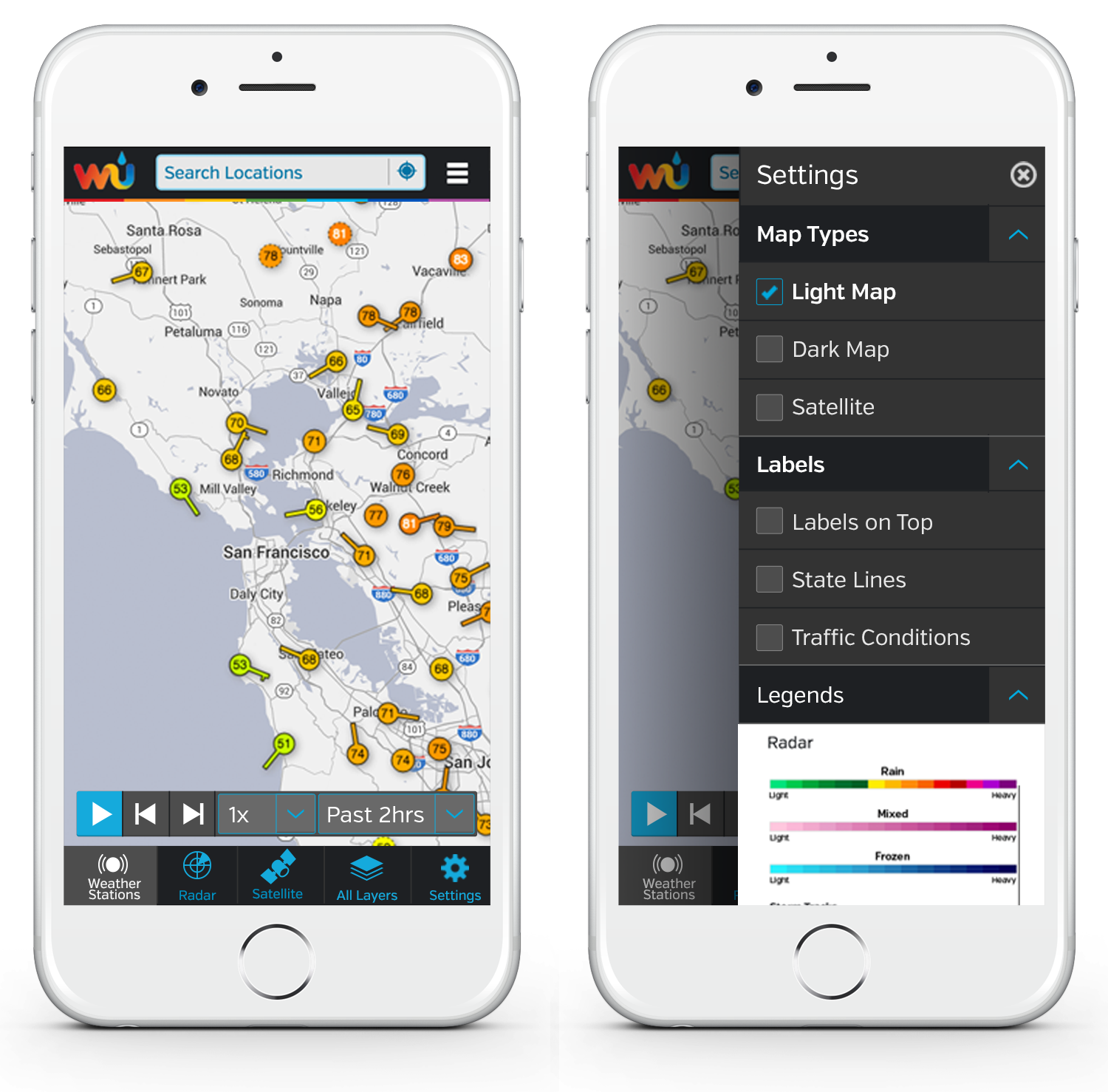
WunderMap on mobile, full screen and with settings menu open.

WunderMap on larger screen.